AI Inbox Triage
Process your inbox tasks with AI-powered suggestions for organizing and scheduling.
How to Start
Click Process Inbox with AI in your Inbox view. Cadeo opens a conversational interface that walks you through each task one at a time.
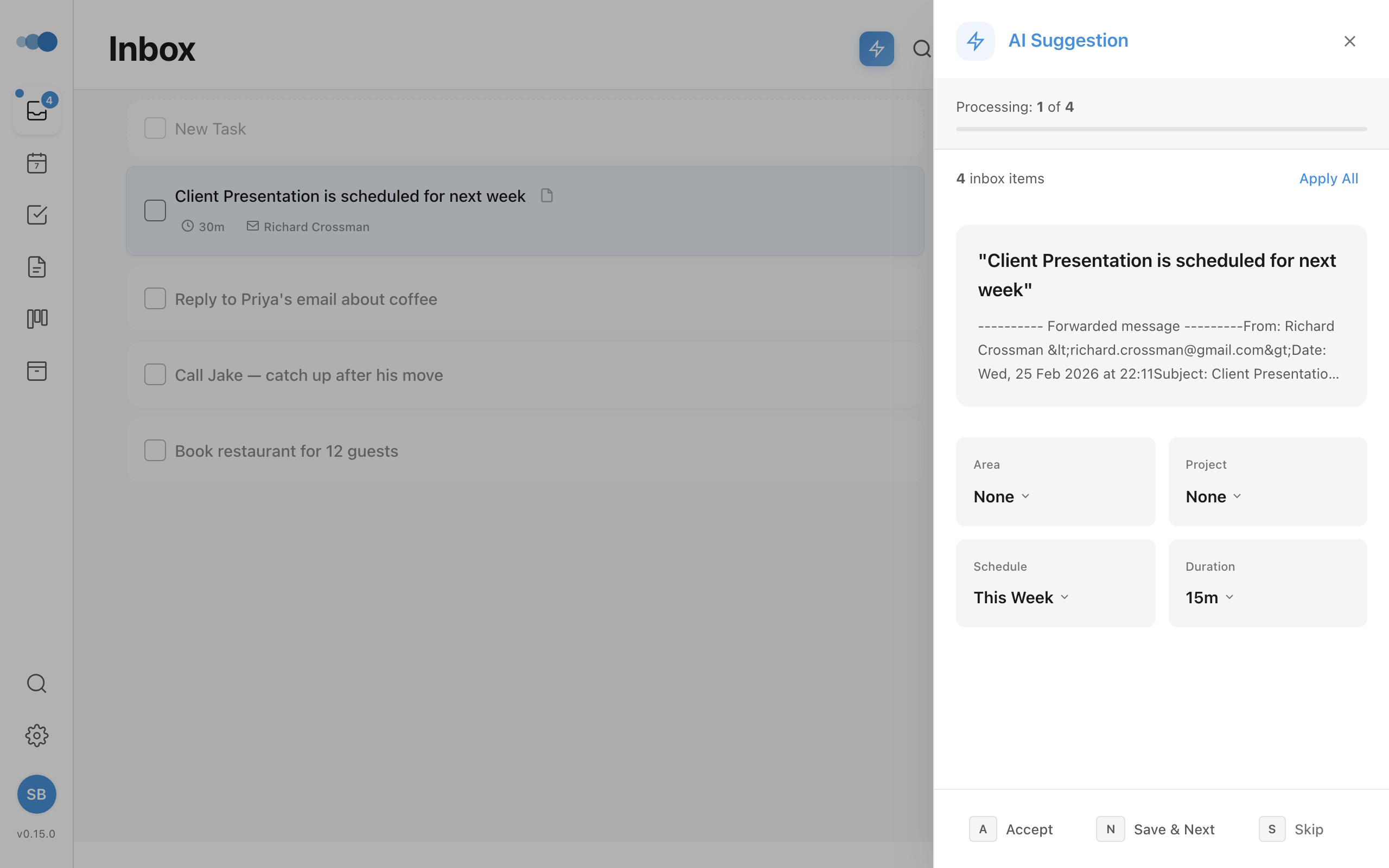
What the AI Suggests
For each inbox task, you'll see suggestion cards for:
| Suggestion | Options |
|---|---|
| Area | Your existing areas |
| Project | Your projects, grouped by area |
| Schedule | Today, Tomorrow, This Week, Next Week, Someday |
| Duration | 15 minutes to 4 hours |
Each card shows the AI's suggested value. You can:
- Click to accept the suggestion
- Open the picker to choose a different value
- Clear to remove the suggestion
Processing Flow
- Greeting — time-of-day greeting showing your inbox task count
- Task-by-task processing — review suggestions for each task
- Progress bar — shows current task number and overall progress
- Streaks — visual counter when you accept 3+ suggestions in a row
Why? — the reasoning inspector
Next to each task's title you'll see a quiet Why? button (once Cadeo has finished triaging that task). Click it to open the AI reasoning inspector — the same modal Cadeo Chat and Plan My Day use. It shows:
- The model Cadeo used (Qwen 3 locally, or Gemini in the cloud)
- The suggested area, project, schedule, priority, duration, and deadline, each with the AI's stated reason
- The k-NN duration neighbours — other past tasks of yours that look like this one, and how long they actually took (the basis Cadeo uses to calibrate the duration guess)
- Cadeo's own confidence band (high / medium / low)
The audit-grade view of every categorisation, in one place. Hidden by default; opens only when you ask.
Keyboard Shortcuts
| Shortcut | Action |
|---|---|
→ | Next task |
← | Previous task |
Ctrl+E / Cmd+E | Apply all suggestions |
1-4 | Quick-select schedule options |
Escape | Close panel |
How the AI Learns
Cadeo learns from your triage choices automatically. Every time you accept, modify, or skip a suggestion, the AI records it. After 5+ interactions, patterns emerge:
- Acceptance patterns — "you accept 72% of triage suggestions"
- Common corrections — "when a task mentions 'client', you always assign it to Clients area with high priority"
- Scheduling preferences — "you usually schedule tasks for this week"
These patterns are injected into AI prompts so future suggestions match your habits. See AI Settings for more details.
Context-Aware Triage
On the desktop app with local AI, the triage engine automatically searches your recent tasks and notes for related context. For example, when triaging "Follow up with Sarah", the AI might see a recent meeting note about your conversation with Sarah and factor that into its area/project/schedule suggestions.
Fallback Behavior
If AI is unavailable, Cadeo uses keyword-based suggestions from your learned preferences. AI enhancement runs in the background when available.
In your daily rituals
You don't have to remember to come here. The Morning Brief and the End of Day Reflection each include a short Clear your inbox step that files your captures in a few grouped decisions, right inside the ritual. See Clear your inbox.
Plan My Week still begins with Step 0: Inbox to Zero, which opens this panel. Continuing without clarifying is always allowed: the Continue with N unclarified button never blocks your planning session.
Use this panel when you want to go through captures one at a time and set every field: priority, duration, deadline, or bundling a group into a project.